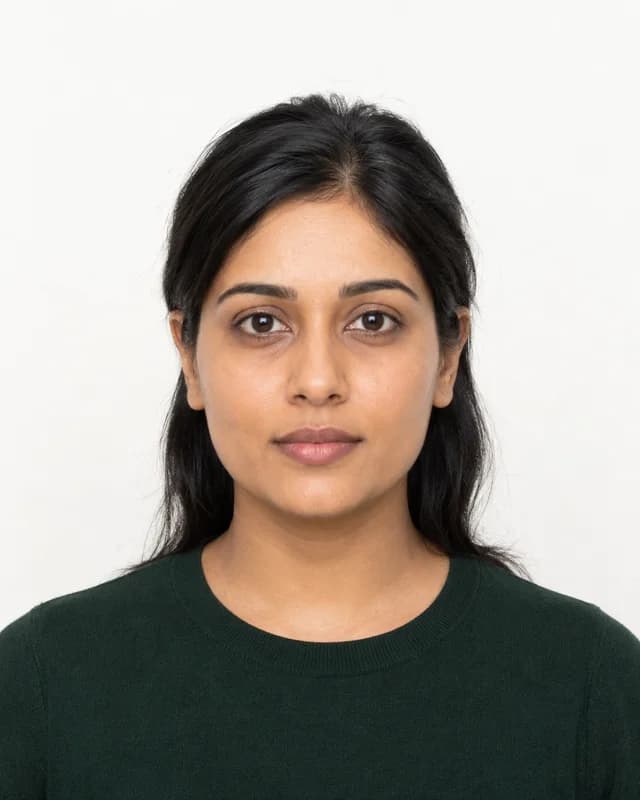
Create Your Russia Passport Photo Online — 35×45mm, Gosuslugi-Ready in Minutes
Upload a photo and this tool builds a fully compliant Russian passport photo automatically. It crops to the required 35mm × 45mm size, positions your head inside the 71%–80% frame-height window the GUVM MVD's biometric scale demands, swaps your background for pure white, and exports a JPEG sharp enough for both Gosuslugi digital upload and an in-person MFC print. No studio visit, no manual measuring, no repeat trip to a print counter.
Whether you're applying for the standard internal passport or the 10-year biometric international passport, the photo has to pass the same automated facial-mapping check the Gosuslugi portal runs on upload — this tool builds every export to clear that check on the first try.
How the Tool Works
- Upload a photo. A recent selfie or a photo someone else takes against a plain wall gives the AI what it needs.
- The AI measures and crops. Landmark detection maps your pupils, chin, and crown, then builds the 35×45mm frame so your head lands inside the 71%–80% window the GUVM MVD checks for.
- Download and go. Get a Gosuslugi-ready digital JPEG plus a print-ready A4 sheet for MFC or passport office submission.
Russia Passport Photo — 2026 Specifications
What the Tool Fixes Automatically
- Wrong head scale: the tool re-crops every upload so the chin-to-crown height lands inside the 71%–80% window with a 5mm top margin, matching GUVM MVD's biometric scale check.
- Off-white background: the AI removes your original background and replaces it with solid white — a single shadow behind you is enough to trigger a Gosuslugi "technical error."
- Uneven lighting and red-eye: exposure balances automatically across the face, and the tool flags any red-eye before you download.
- Low resolution: exports render sharp enough for both 300 DPI digital upload and higher-resolution print requests.
Check These Before You Upload
The tool handles cropping, background, and lighting. You still control expression, clothing, and accessories:
- Keep a strictly neutral expression — eyes open, mouth closed, no hint of a smile
- Look straight into the camera; keep hair clear of your eyes and eyebrows since these are primary biometric landmarks
- Wear dark-coloured clothing — a white shirt against the white background causes the "floating head" effect that Gosuslugi's validator flags
- Remove glasses unless medically necessary; if worn, frames must be thin with no reflections on the lenses
- Keep facial hair as part of your daily appearance, but don't let it obscure the chin line
- Use a photo taken within 6 months of your application date
Digital File Plus a Print-Ready Sheet
Gosuslugi applications need a digital JPEG upload that passes the portal's automated facial-mapping validator, while MFC and passport-office visits still call for a printed photo. Every download from this tool includes both: a Gosuslugi-ready digital file and a print-ready A4 sheet, generated from the same source image.
Frequently Asked Questions
Why does Gosuslugi reject a photo that looks fine on screen?
The usual invisible causes are a background with a faint grey tint, a head-height ratio just outside 71%–80%, or JPEG compression artifacts the portal's validator flags as a technical error. This tool checks and corrects all three before export.
Can I wear a white shirt in my Russia passport photo?
Avoid it. A white or very pale top blends into the required white background and creates the "floating head" effect biometric scanners reject — dark clothing gives the contrast the check needs.
Does this tool work for both the internal and international passport?
Yes. Both use the same 35×45mm size and 71%–80% head-height standard, so one export covers either application.
Can I keep my glasses on for the photo?
Only if medically necessary, and only with thin frames and zero glare — for the fastest approval, removing them entirely is the safer choice.
What if my head size lands outside 71%–80% after I upload?
That's exactly what the tool corrects. Landmark detection re-crops the frame around your chin and crown until the ratio sits inside the compliant zone, every time.
Error-Free Gosuslugi Processing
This AI tool builds a 35×45mm Russian passport photo that meets GUVM MVD's biometric scale, contrast, and background standards for a smooth Gosuslugi or MFC submission in 2026.